IoT-Based RFID Access Control System with Real-Time Feedback
1. Introduction
This document outlines the setup and operation of an RFID-based access control system using an ESP32, RC522 RFID module, LCD display, buzzer, LED, and servo motor. The system validates RFID tags and provides real-time feedback using various actuators.
2. Component List
| # | Component | Quantity | Description |
|---|---|---|---|
| 1 | ESP32 Dev Board | 1 | Main microcontroller with Wi-Fi capability |
| 2 | RC522 RFID Module | 1 | For reading RFID tags |
| 3 | 16x2 LCD (I2C) | 1 | Displays UID and access status |
| 4 | Buzzer | 1 | Provides audible feedback |
| 5 | LED | 1 | Indicates access status visually |
| 6 | Servo Motor | 1 | Simulates door unlocking mechanism |
| 7 | Jumper Wires | - | For circuit connections |
| 8 | Breadboard | 1 | (Optional) For prototyping |
| 9 | Power Supply | 1 | External 5V for powering servo motor |
3. Pin Configuration
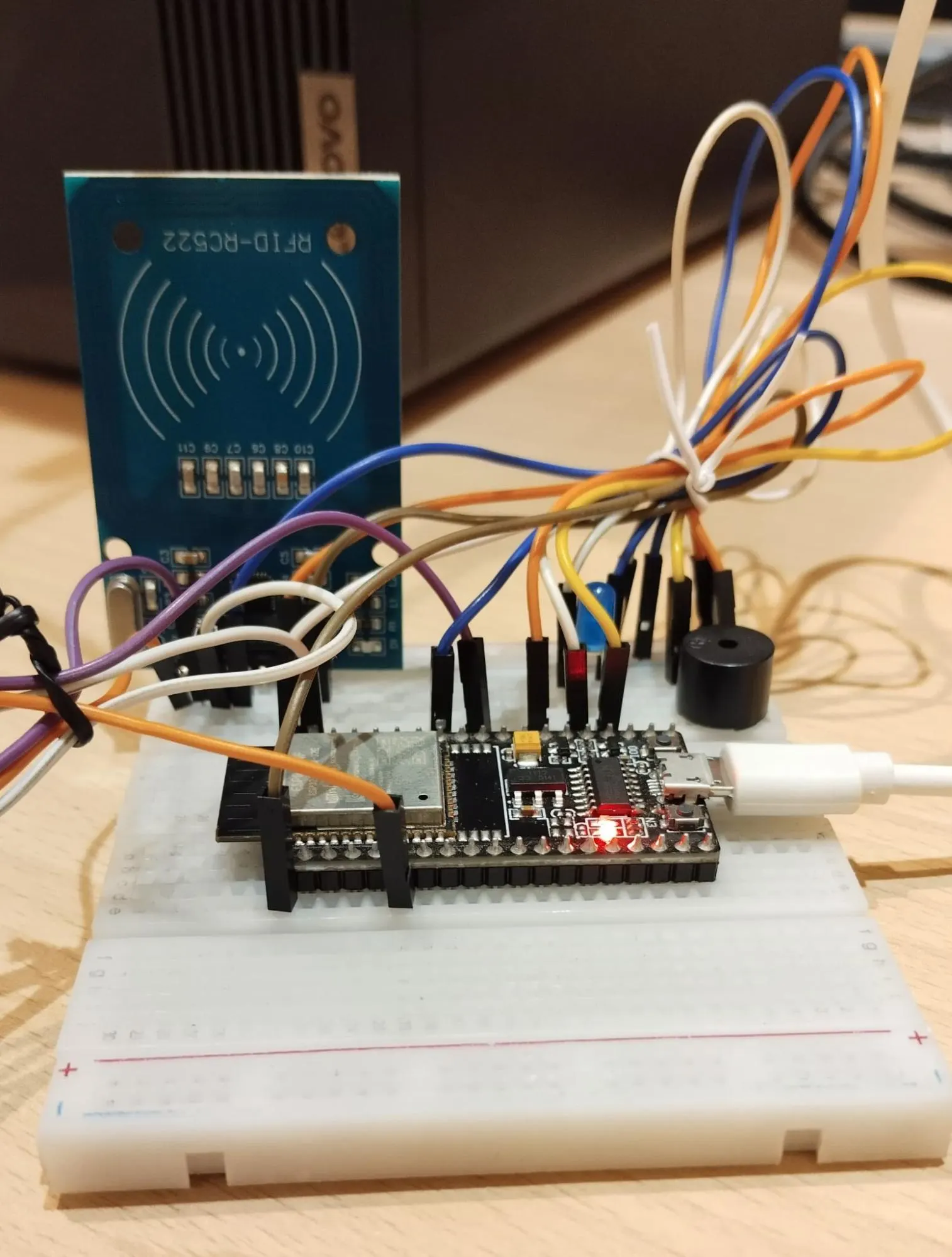
3.1 RC522 RFID Module ↔ ESP32
| # | RC522 Pin | ESP32 GPIO | Description |
|---|---|---|---|
| 1 | SDA | GPIO5 | Slave Select |
| 2 | SCK | GPIO18 | Serial Clock |
| 3 | MOSI | GPIO23 | Master Out Slave In |
| 4 | MISO | GPIO19 | Master In Slave Out |
| 5 | RST | GPIO4 | Reset |
| 6 | VCC | 3.3V | Power supply |
| 7 | GND | GND | Ground |
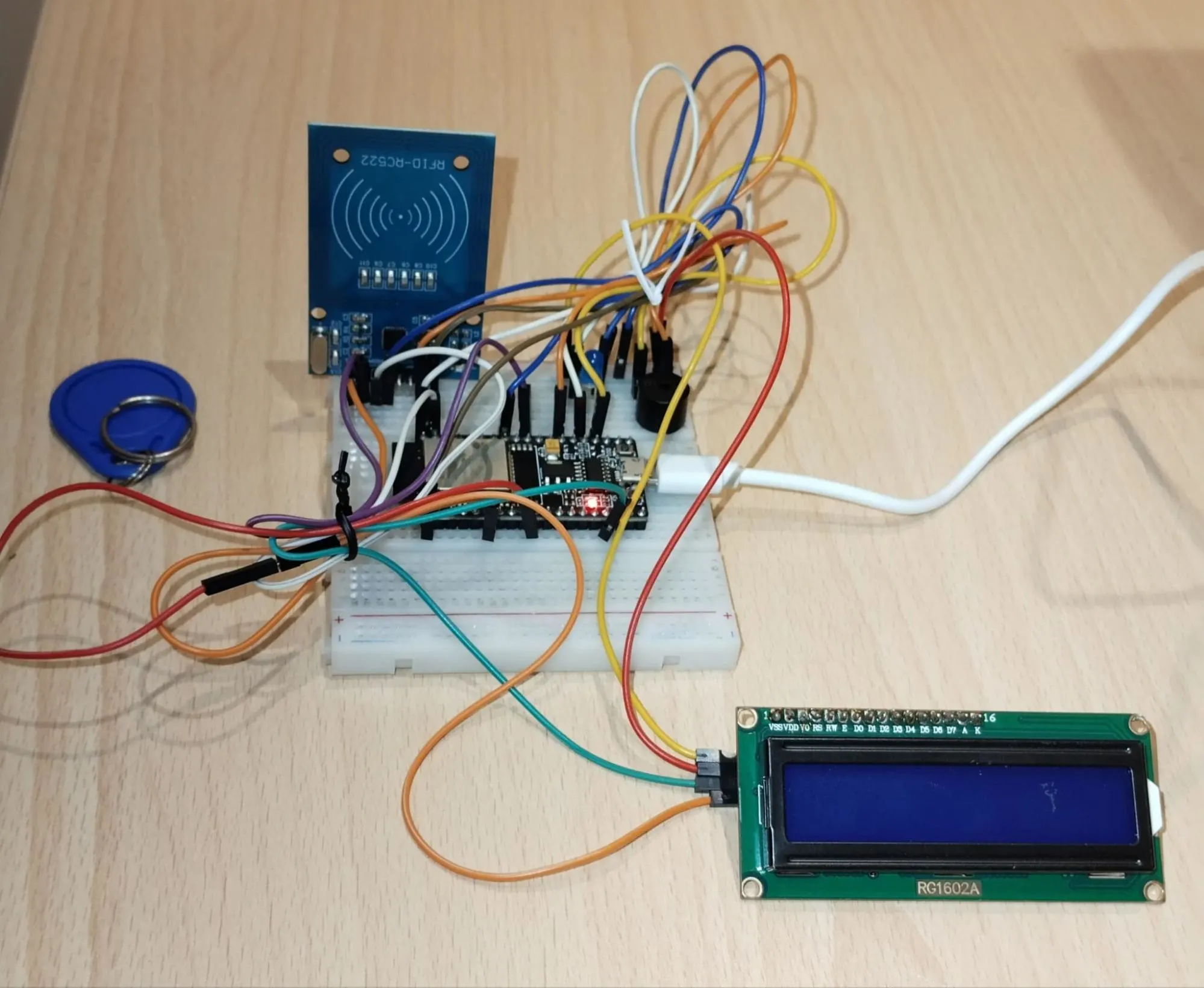
3.2 LED, Buzzer, Servo
| # | Component | ESP32 GPIO | Notes |
|---|---|---|---|
| 1 | LED | GPIO2 | Connect via 220Ω resistor to ground |
| 2 | Buzzer | GPIO15 | Positive to GPIO15, negative to GND |
| 3 | Servo | GPIO13 | Signal wire from servo to GPIO13 |
3.3 LCD (I2C)
| # | LCD Pin | ESP32 GPIO | Notes |
|---|---|---|---|
| 1 | SDA | GPIO21 | I2C Data Line |
| 2 | SCL | GPIO22 | I2C Clock Line |
| 3 | VCC | 5V | Power |
| 4 | GND | GND | Ground |
4. System Operation

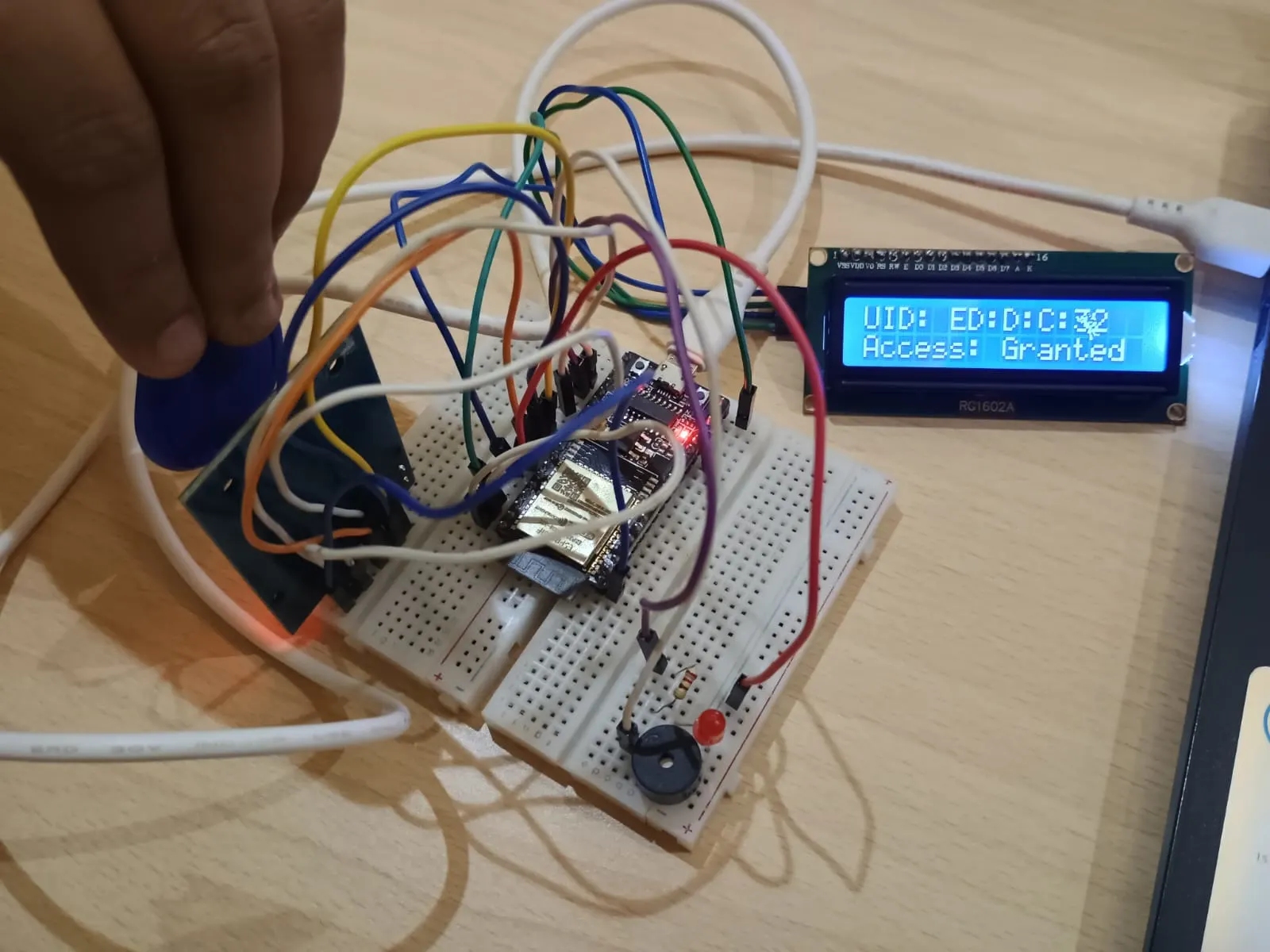
- RFID card is scanned using RC522
- UID is read and compared against a predefined UID.
- If UID matches:
- LED lights up.
- Buzzer beeps once.
- Servo motor rotates to unlock.
- LCD displays "Access Granted" and UID.
- If UID does not match:
- LED blinks three times.
- Buzzer beeps three times.
- LCD displays "Access Denied" and UID.
4. Google Apps Script Setup
Steps:
- Go to: https://script.google.com
- Create a new project.
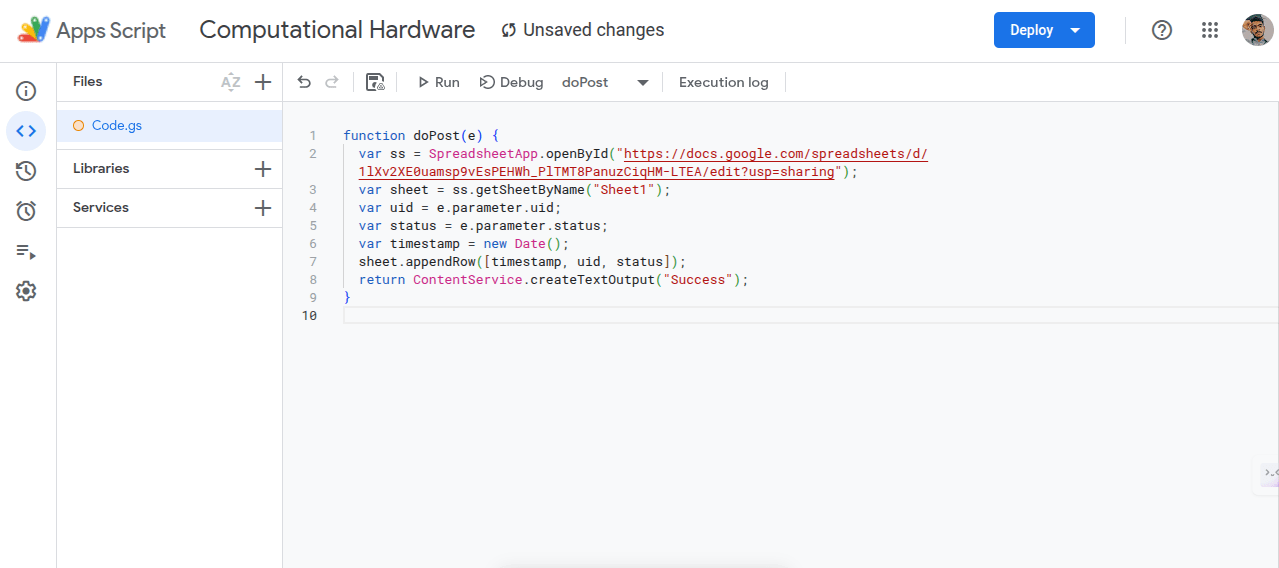
- Paste the code below and replace
YOUR_SPREADSHEET_IDwith your actual spreadsheet ID.
Code
    function doPost(e) {
    var ss = SpreadsheetApp.openById("https://docs.google.com/spreadsheets/d/1lXv2XE0uamsp9vEsPEHWh_PlTMT8PanuzCiqHM-LTEA/edit?usp=sharing");
    var sheet = ss.getSheetByName("Sheet1");
    var uid = e.parameter.uid;
    var status = e.parameter.status;
    var timestamp = new Date();
    sheet.appendRow([timestamp, uid, status]);
    return ContentService.createTextOutput("Success");
    }
Save the project and deploy as Web App:
- Execute as: Me
- Access: Anyone
- Click Deploy, authorize, and copy the Web App URL.
5. ESP32 Arduino Code
The following code reads RFID data, compares the UID, opens the gate if access is granted, logs the data via HTTP POST to Google Sheets, and displays real-time information.
Code
    // Include necessary libraries
    #include <Wire.h>
    #include <LiquidCrystal_I2C.h>
    #include <SPI.h>
    #include <MFRC522.h>
    #include <ESP32Servo.h>
    #include <ThreeWire.h>
    #include <RtcDS1302.h>
    #include <WiFi.h>
    #include <HTTPClient.h>

    // Pin definitions
    #define SS_PIN 5
    #define RST_PIN 4
    #define LED_PIN 2
    #define BUZZER_PIN 15
    #define SERVO_PIN 13
    #define DS1302_CLK 14
    #define DS1302_IO  27
    #define DS1302_CE  26

    byte knownUID[] = { 0xED, 0x0D, 0x0C, 0x32 };

    // Component setup
    LiquidCrystal_I2C lcd(0x27, 16, 2);
    MFRC522 mfrc522(SS_PIN, RST_PIN);
    Servo gateServo;
    ThreeWire myWire(DS1302_IO, DS1302_CLK, DS1302_CE);
    RtcDS1302<ThreeWire> Rtc(myWire);

    // Wi-Fi configuration
    const char* ssid = "anandhakumar";
    const char* password = "7092991250";
    const String scriptURL = "https://script.google.com/macros/s/https://docs.google.com/spreadsheets/d/1lXv2XE0uamsp9vEsPEHWh_PlTMT8PanuzCiqHM-LTEA/edit?usp=sharing";

    void setup() {
    Serial.begin(115200);
    SPI.begin();
    mfrc522.PCD_Init();
    pinMode(LED_PIN, OUTPUT);
    pinMode(BUZZER_PIN, OUTPUT);
    lcd.begin(); lcd.backlight(); lcd.setCursor(0, 0); lcd.print("Scan your card");

    gateServo.setPeriodHertz(50);
    gateServo.attach(SERVO_PIN, 500, 2400);
    gateServo.write(0);

    Rtc.Begin();
    RtcDateTime customTime(2025, 4, 19, 15, 45, 00);
    Rtc.SetDateTime(customTime);
    if (!Rtc.IsDateTimeValid()) Serial.println("RTC invalid");
    if (!Rtc.GetIsRunning()) Rtc.SetIsRunning(true);

    WiFi.begin(ssid, password);
    Serial.print("Connecting to WiFi");
    while (WiFi.status() != WL_CONNECTED) { delay(500); Serial.print("."); }
    Serial.println("\nWiFi connected.");
    }

    void loop() {
    if (!mfrc522.PICC_IsNewCardPresent() || !mfrc522.PICC_ReadCardSerial()) return;

    bool match = true;
    String uidStr = "";
    lcd.clear(); lcd.setCursor(0, 0); lcd.print("UID: ");

    for (byte i = 0; i < mfrc522.uid.size; i++) {
        byte val = mfrc522.uid.uidByte[i];
        uidStr += String(val, HEX);
        lcd.print(val, HEX);
        if (i < mfrc522.uid.size - 1) { lcd.print(":"); uidStr += ":"; }
        if (val != knownUID[i]) match = false;
    }
    uidStr.toUpperCase();

    if (match) {
        Serial.println("✅ Access Granted");
        lcd.setCursor(0, 1); lcd.print("Access: Granted");
        digitalWrite(LED_PIN, HIGH); digitalWrite(BUZZER_PIN, HIGH);
        gateServo.write(180); delay(500);
        digitalWrite(LED_PIN, LOW); digitalWrite(BUZZER_PIN, LOW);
        delay(3000); gateServo.write(0);
        sendToGoogleSheet(uidStr, "Granted");
    } else {
        Serial.println("❌ Access Denied");
        lcd.setCursor(0, 1); lcd.print("Access: Denied");
        for (int i = 0; i < 3; i++) {
        digitalWrite(LED_PIN, HIGH); digitalWrite(BUZZER_PIN, HIGH);
        delay(200); digitalWrite(LED_PIN, LOW); digitalWrite(BUZZER_PIN, LOW);
        delay(200);
        }
        sendToGoogleSheet(uidStr, "Denied");
    }

    RtcDateTime now = Rtc.GetDateTime();
    printDateTime(now);
    mfrc522.PICC_HaltA();
    mfrc522.PCD_StopCrypto1();
    delay(1000);
    }

    void sendToGoogleSheet(String uid, String status) {
    if (WiFi.status() == WL_CONNECTED) {
        HTTPClient http;
        String fullURL = scriptURL + "?uid=" + uid + "&status=" + status;
        http.begin(fullURL);
        int httpCode = http.GET();
        if (httpCode > 0) Serial.print("Data sent: "), Serial.println(httpCode);
        else Serial.print("Failed to send. Code: "), Serial.println(httpCode);
        http.end();
    } else {
        Serial.println("WiFi not connected");
    }
    }

    void printDateTime(const RtcDateTime& dt) {
    char buf[20];
    snprintf_P(buf, sizeof(buf), PSTR("%02u/%02u/%04u %02u:%02u:%02u"),
                dt.Month(), dt.Day(), dt.Year(), dt.Hour(), dt.Minute(), dt.Second());
    Serial.println(buf);
    }
6. Conclusion
This system effectively demonstrates real-time access control and logging using IoT principles. It’s scalable for office entry systems, school attendance tracking, and more.